
Author: Jeff Geerling. Originally published on December 18, 2025. Full translation for XORit. Original article. The first-person narrative, assessments, and time references below belong to the author and refer to the date of the original publication. Photos and graphics are from the original.
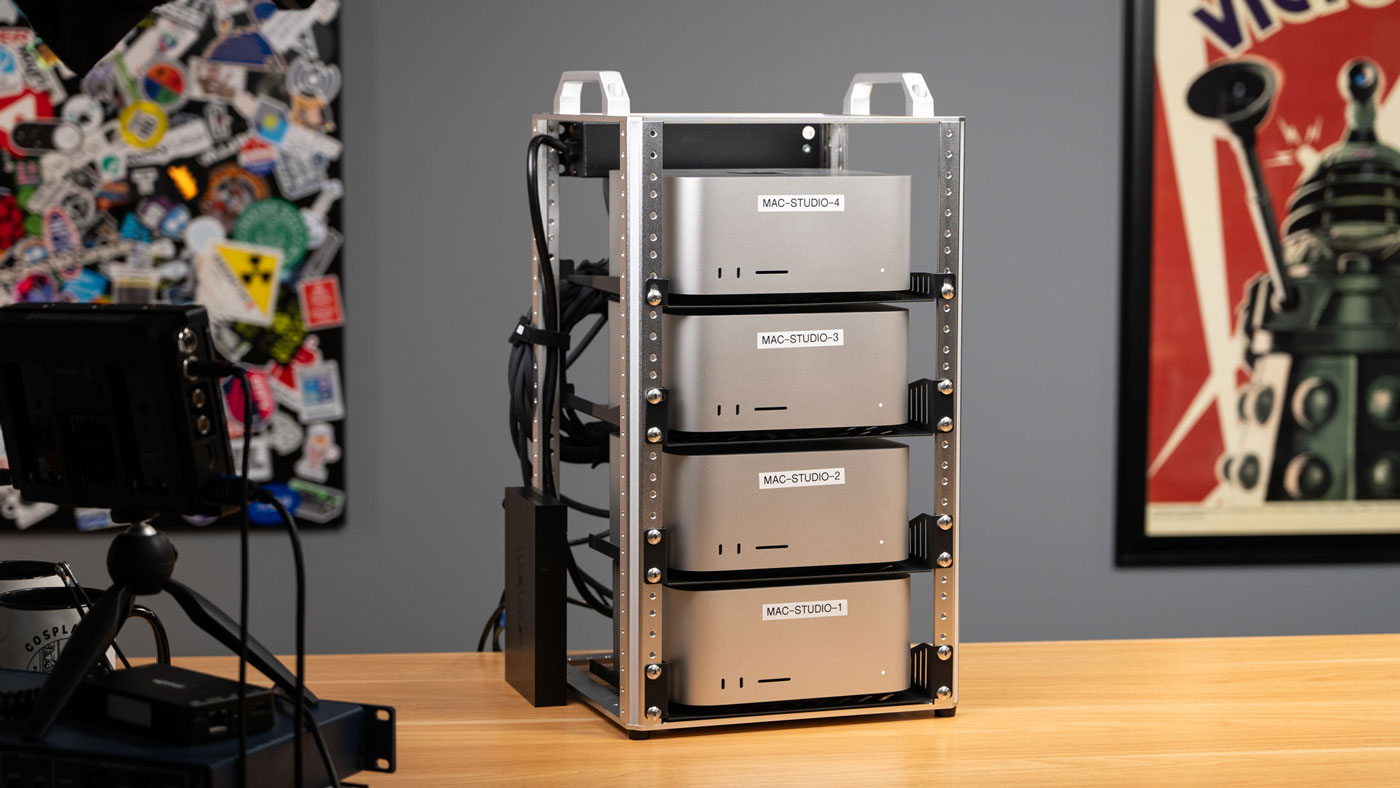
Apple provided me with this Mac Studio cluster to test RDMA over Thunderbolt — new feature in macOS 26.2. The easiest way to try it is with Exo 1.0 — an open-source tool for clustering computers for private AI. RDMA allows all Macs to work as if they have one huge shared RAM pool, which speeds up, for example, the operation of very large AI models.
The stack of Macs I tested, with 1.5 TB of unified memory, costs just under $40,000. And if you’re wondering: no, I can’t justify such expenses for this kind of project. Apple loaned the Mac Studio for testing. I also want to thank DeskPi for sending the four-post mini rack that houses the cluster.
The last time I heard anything interesting about Apple and HPC — high-performance computing — was back in the early 2000s, when the company released Xserve.

Apple had its own solution for clustering called Xgrid… which failed. Several universities built clusters, but the technology never became widespread, and now Xserve is a distant memory.
I don’t know if it happened by accident or if Apple is playing the long game, but the Mac Studio with M3 Ultra turned out to be a very good option for running local AI models. And thanks to RDMA support, reducing memory access latency from 300 µs to less than 50 µs, clustering now improves performance, especially when working with huge models.
They also perform well in creative applications and, at least, in light scientific computing, while consuming less than 250 W and operating almost silently.
The two lower Macs each have 512 GB unified memory and 32 CPU cores and cost 11,699 dollars. The two top ones, with half the memory, cost 8,099 dollars1.
Not cheap.
But after the release DGX Spark from Nvidia and systems on AI Max+ 395 from AMD, which have four times less memory — up to 128 GB, — I decided to test this cluster thoroughly.
Video
This article is a text version of my latest YouTube video, which you can watch below.
Watch Jeff Girling’s video on YouTube
Mini rack for Mac
By a surprisingly lucky coincidence, DeskPi sent a new four-post mini rack TL1 the day before these Macs arrive.
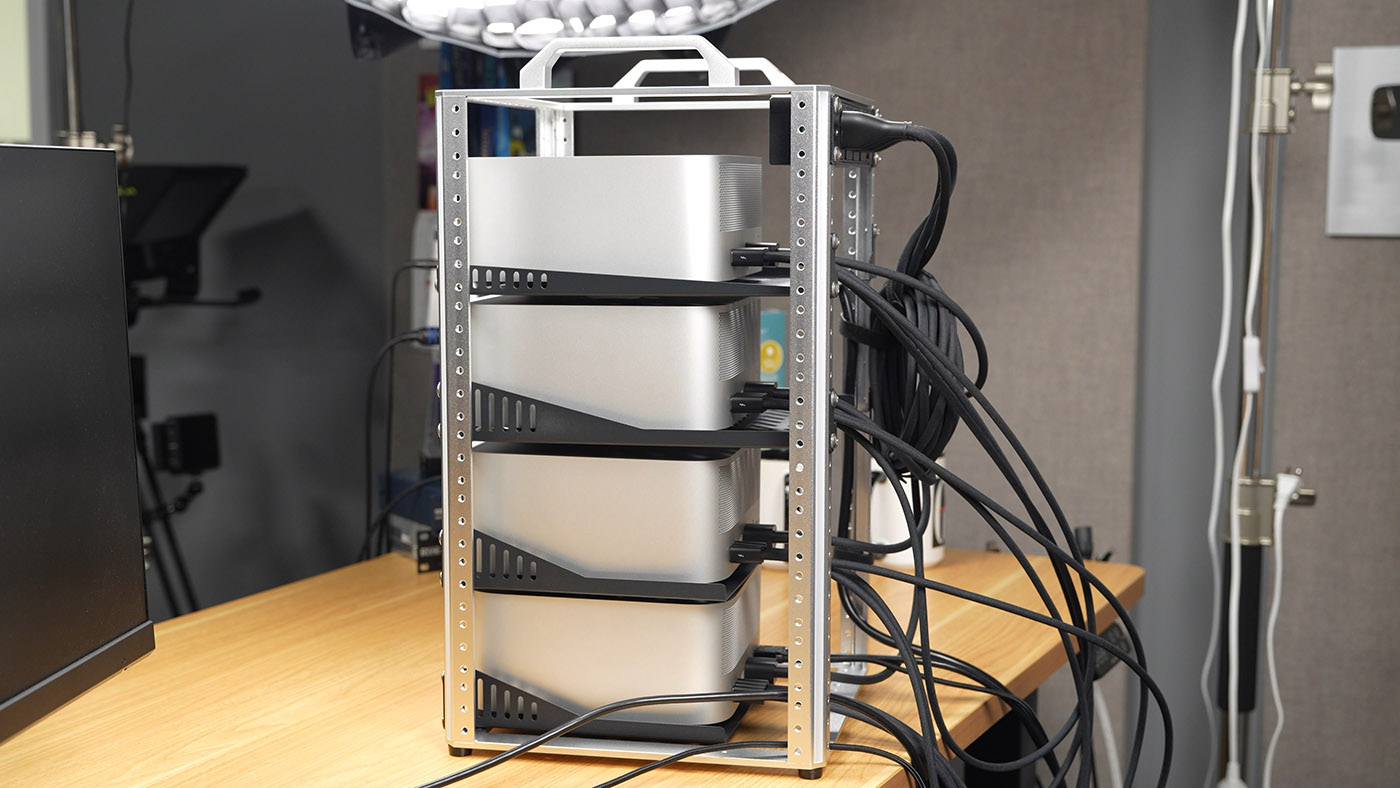
Earlier this year, I launched Project MINI RACK. The idea is to get the benefits of rack-mounted equipment in a form factor that fits on a desk or in a corner of a room.
So far, I haven’t seen solutions for installing Mac Studio in 10-inch racks, except this case for 3D printing, so I simply placed the computers on several 10-inch shelves.
The most annoying thing when installing any Mac except the Pro in a rack is the power button. On the Mac Studio, it is at the back left on a curved surface, so rack mounts must leave access to it.
The open sides of the mini-rack allow reaching in and pressing the button, but you still have to hold the Mac Studio to prevent it from sliding forward!
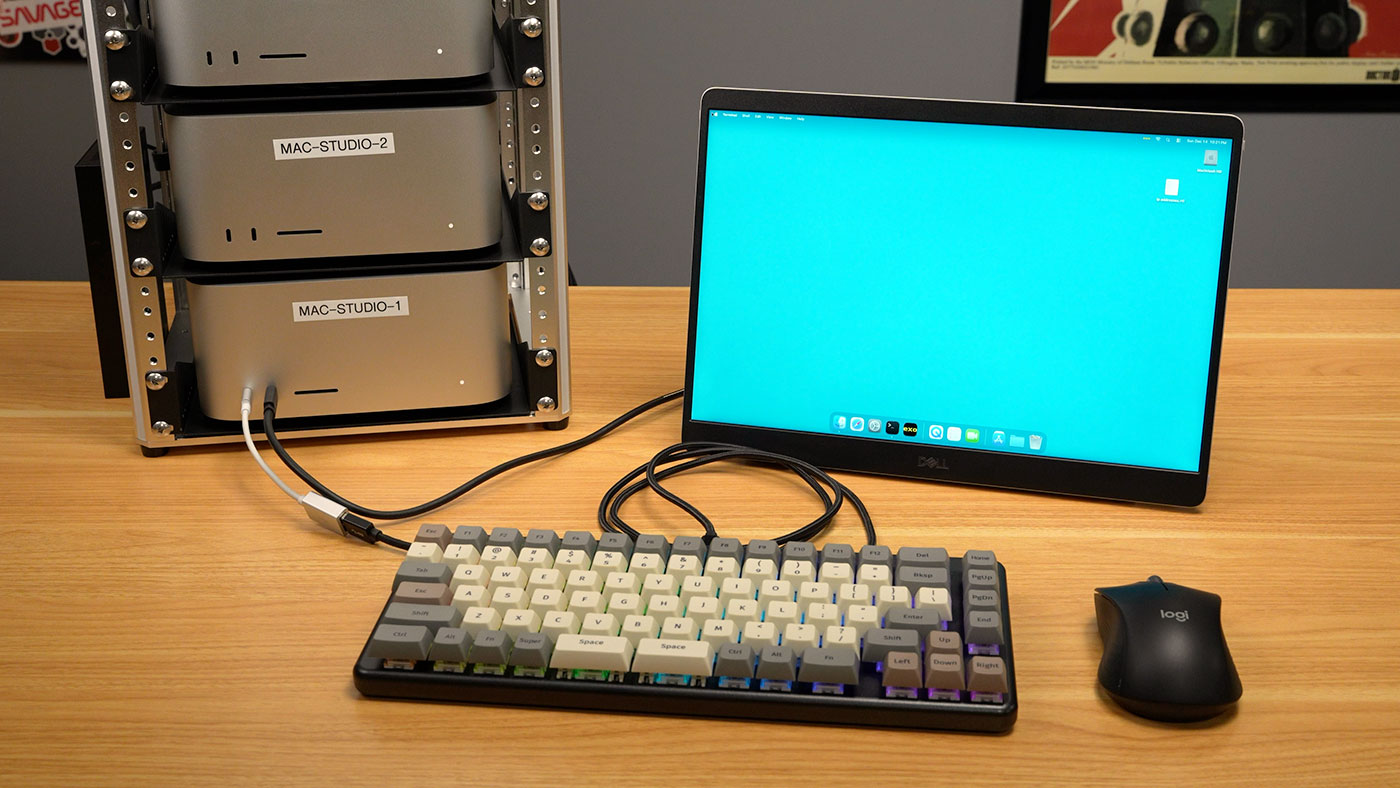
But it’s nice that the Studio has front ports for connecting a keyboard and monitor:
As for power, I’m glad Apple uses an internal power supply. Too many “small” PCs are small only because their power supply is external, in the form of a huge brick. That’s not the case here, but you have to deal with Apple power cables that don’t use C13, which makes it harder to find cables of ideal length to reduce cable clutter.
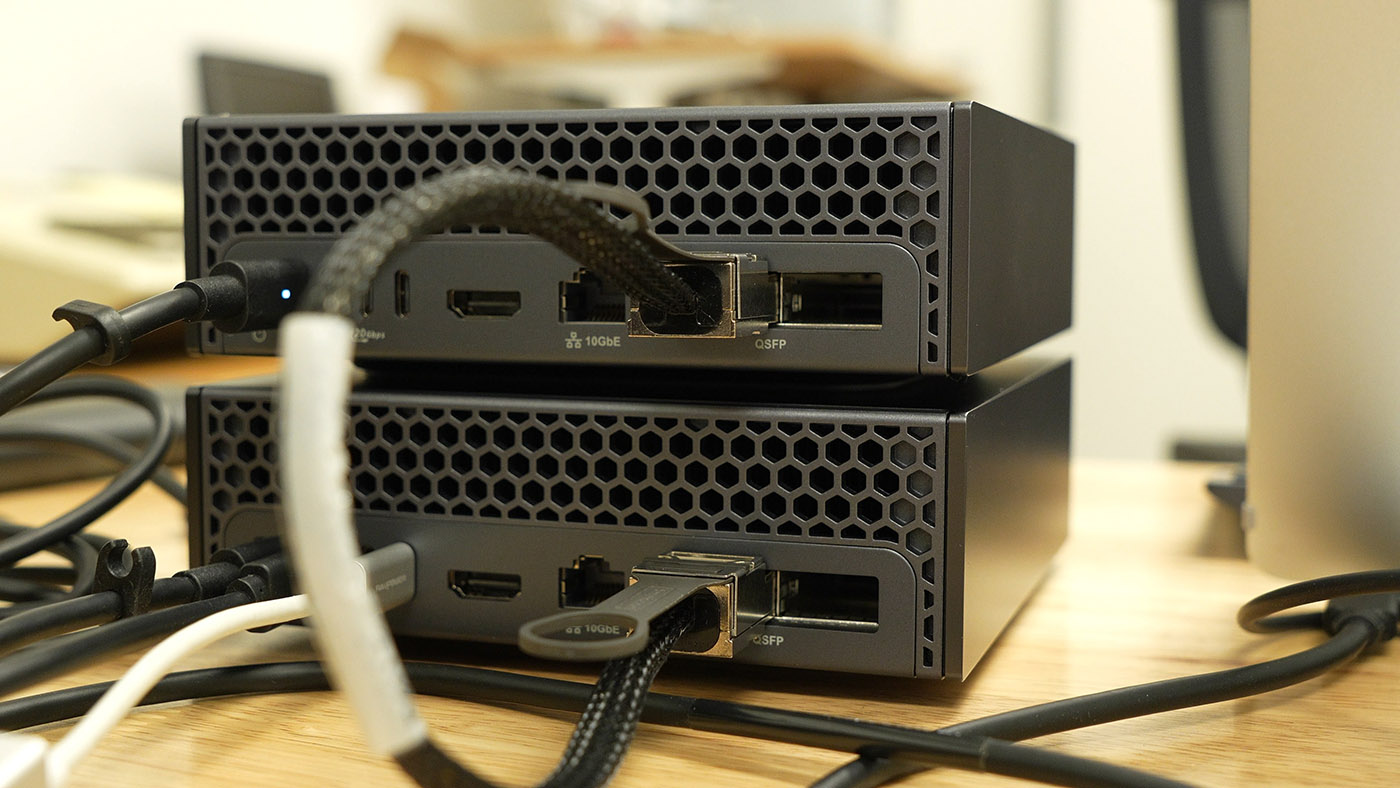
In network connectivity, DGX Spark is better designed than Apple. It has large rectangular QSFP ports, shown above. Connectors hold more securely but are still easy to insert and remove.
The Mac Studio has 10 Gbps Ethernet, but the high-speed connection — with actual throughput of about 50-60 Gbps — is provided by Thunderbolt. Even with expensive Apple cables at 70 dollars each I’m not sure this connector confusion will withstand long-term use in many conditions.
There is a solution ThunderLok-A, which adds a small locking screw to each cable. But I wasn’t going to drill into borrowed Mac Studios and tap threads in them just to check compatibility.
Moreover, as far as I can tell, Thunderbolt 5 switches don’t exist. So you can’t connect multiple Macs to one central switch – you have to connect each Mac to each other, further tangling cables. Currently, up to four Macs can be connected this way, although I don’t think that’s necessarily a hard limit of the current Mac Studio: Apple stated that all five TB5 ports support RDMA.
But a more important question: do you even need a whole Mac Studio cluster? After all, even one such computer is already very powerful and comparable to four DGX Spark or AI Max+ 395 systems in maximum configurations. And cluster management can be painful.
Mac Studio with M3 Ultra: baseline results
To have a basis for decision-making, I ran basic tests and published all the results—many more than shown here—in my project sbc-reviews.
I will compare the Mac Studio with M3 Ultra to two systems:
- Dell Pro Max with GB10 — similar to Nvidia DGX Spark but with better cooling.
- Framework Desktop Mainboard with AMD AI Max+ 395 chip.
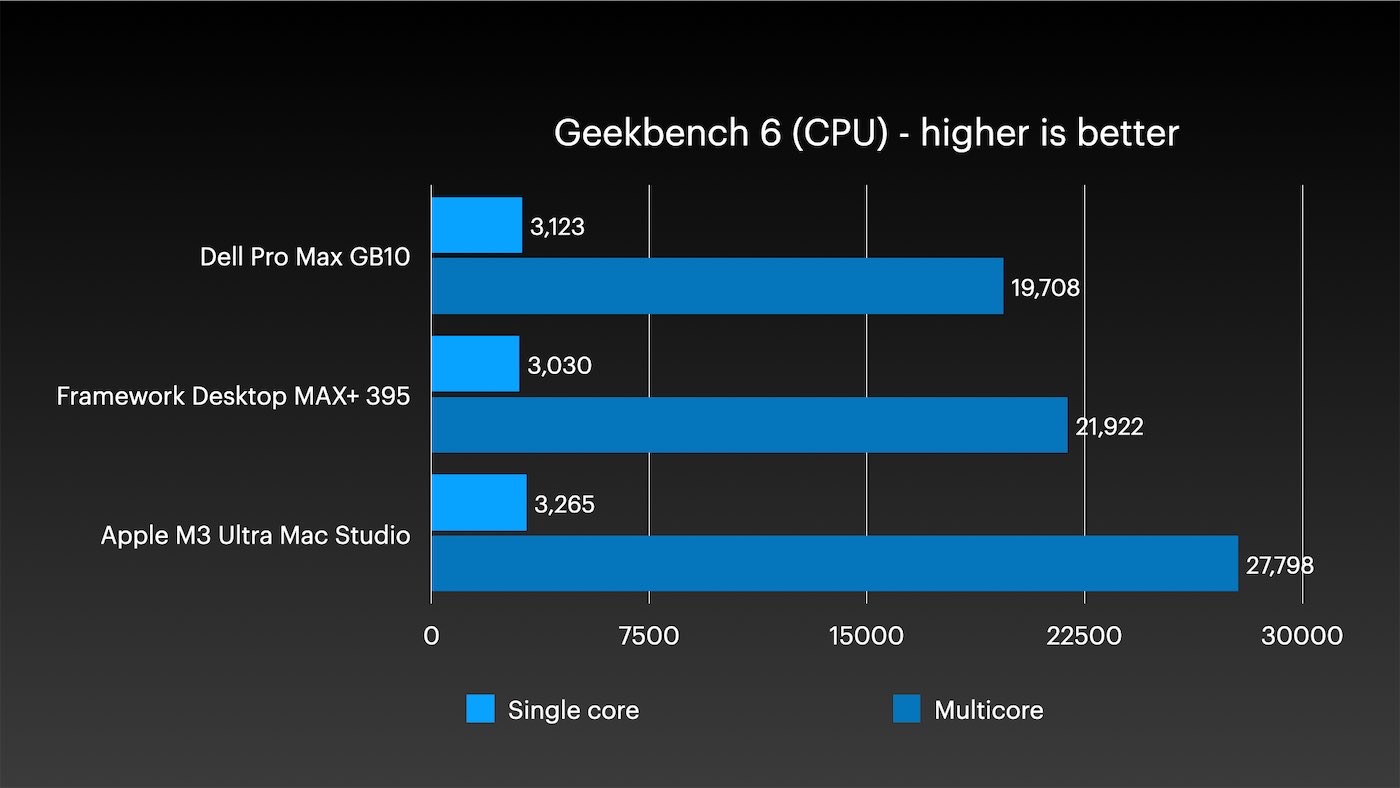
First Geekbench. The M3 Ultra with processor cores from two generations ago outperforms both other systems in single-threaded and multi-threaded tests. In Geekbench 5, which is better suited for processors with a large number of cores, the advantage is even more noticeable.
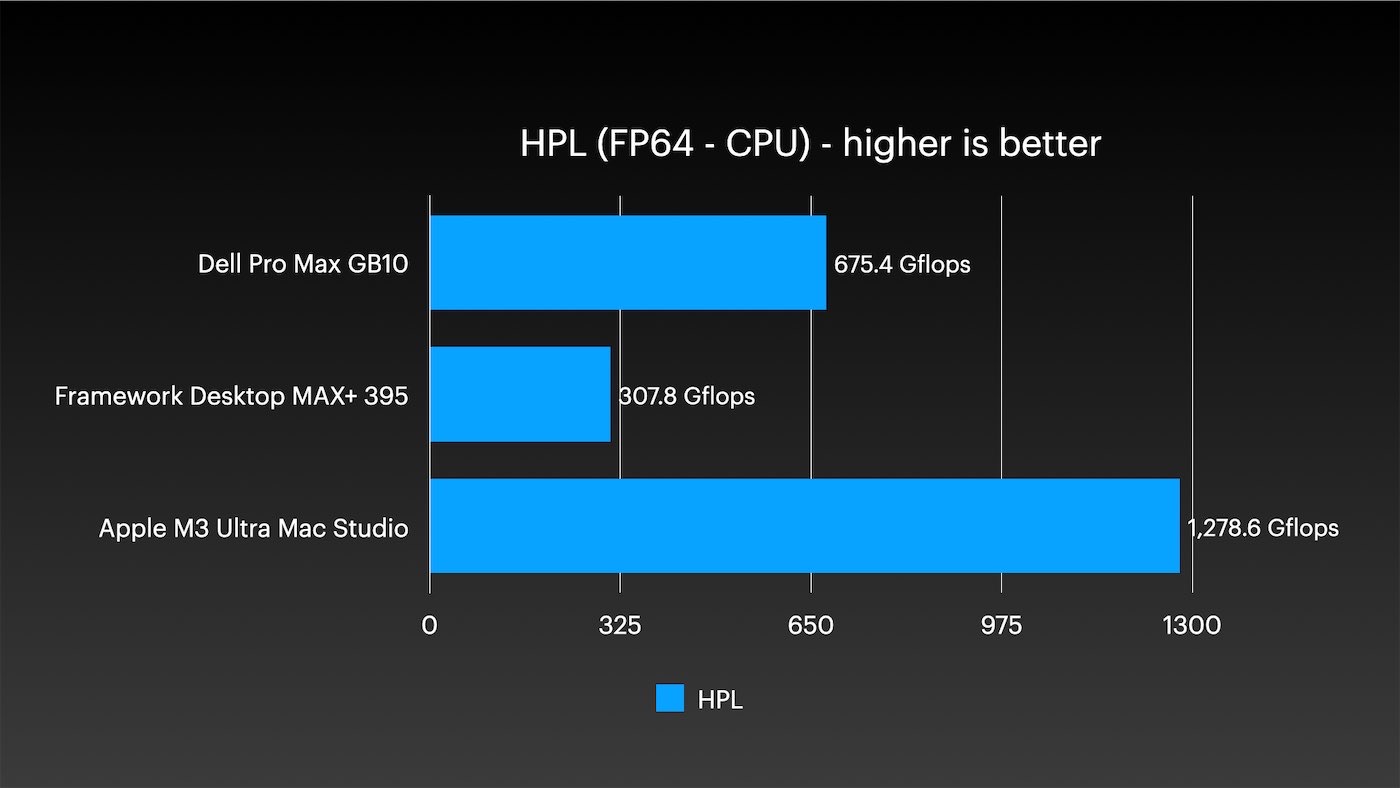
Let’s move to FP64 double-precision computations — my usual the HPL test from top500. The M3 Ultra became the first compact desktop computer I tested to surpass the 1 TFLOPS FP64 mark. That’s almost double the result of the Nvidia GB10, and the AMD AI Max chip was left far behind.
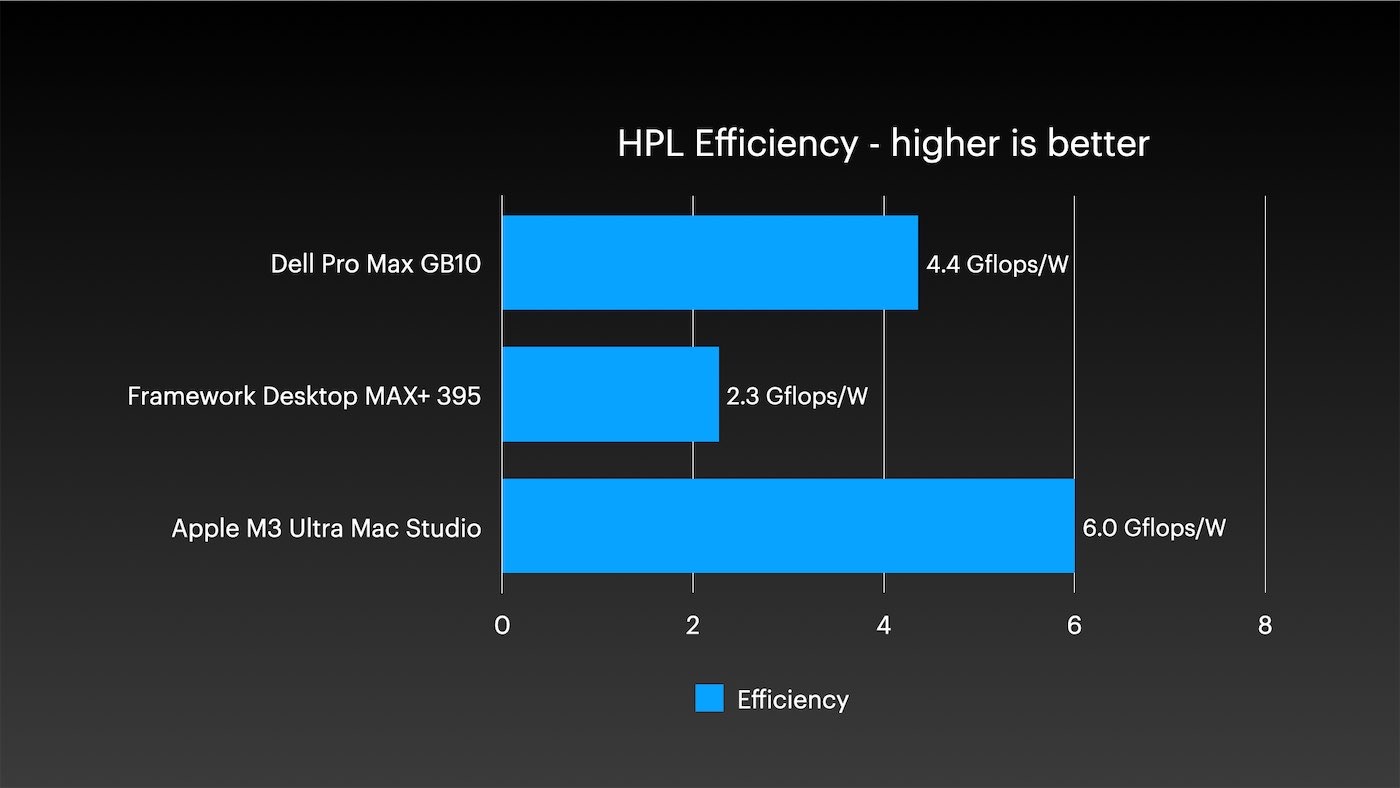
CPU energy efficiency is also excellent, as has been the case with all Apple chips since the A-series. Another related metric: idle power consumption here is under 10 W.
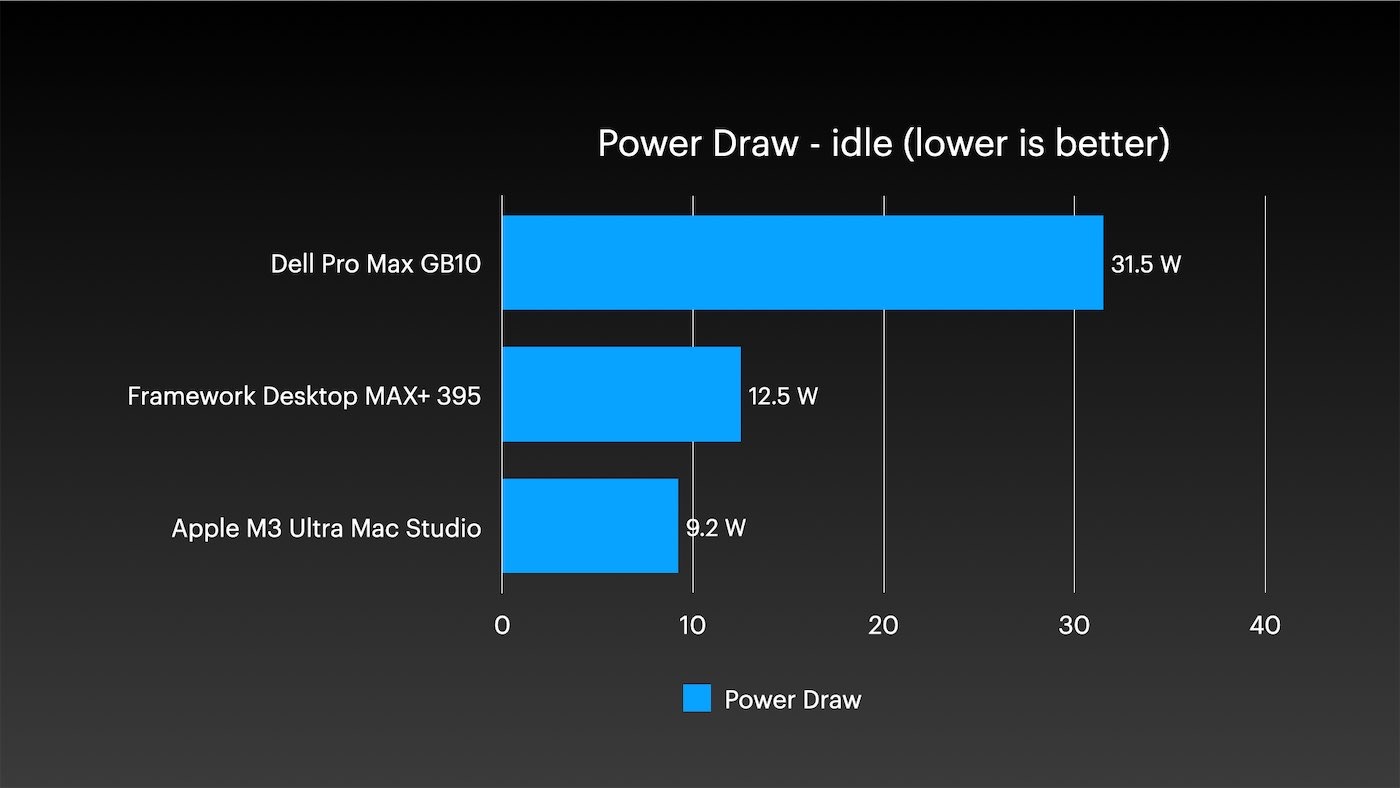
I’ve seen single-board computers that consumed over 10 W at idle, let alone a device that can be considered a personal supercomputer.
In inference, the AI M3 Ultra stands out when working with both small and large models:
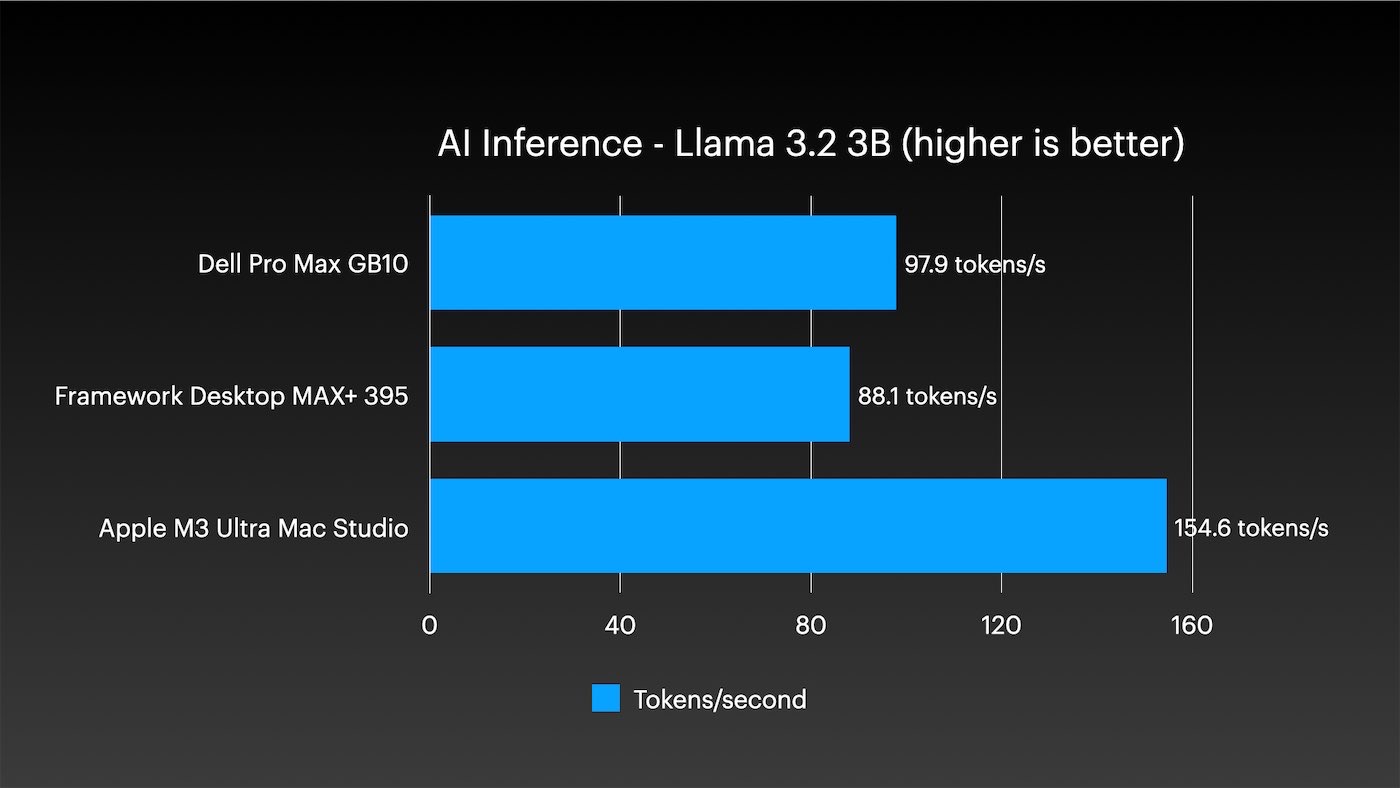
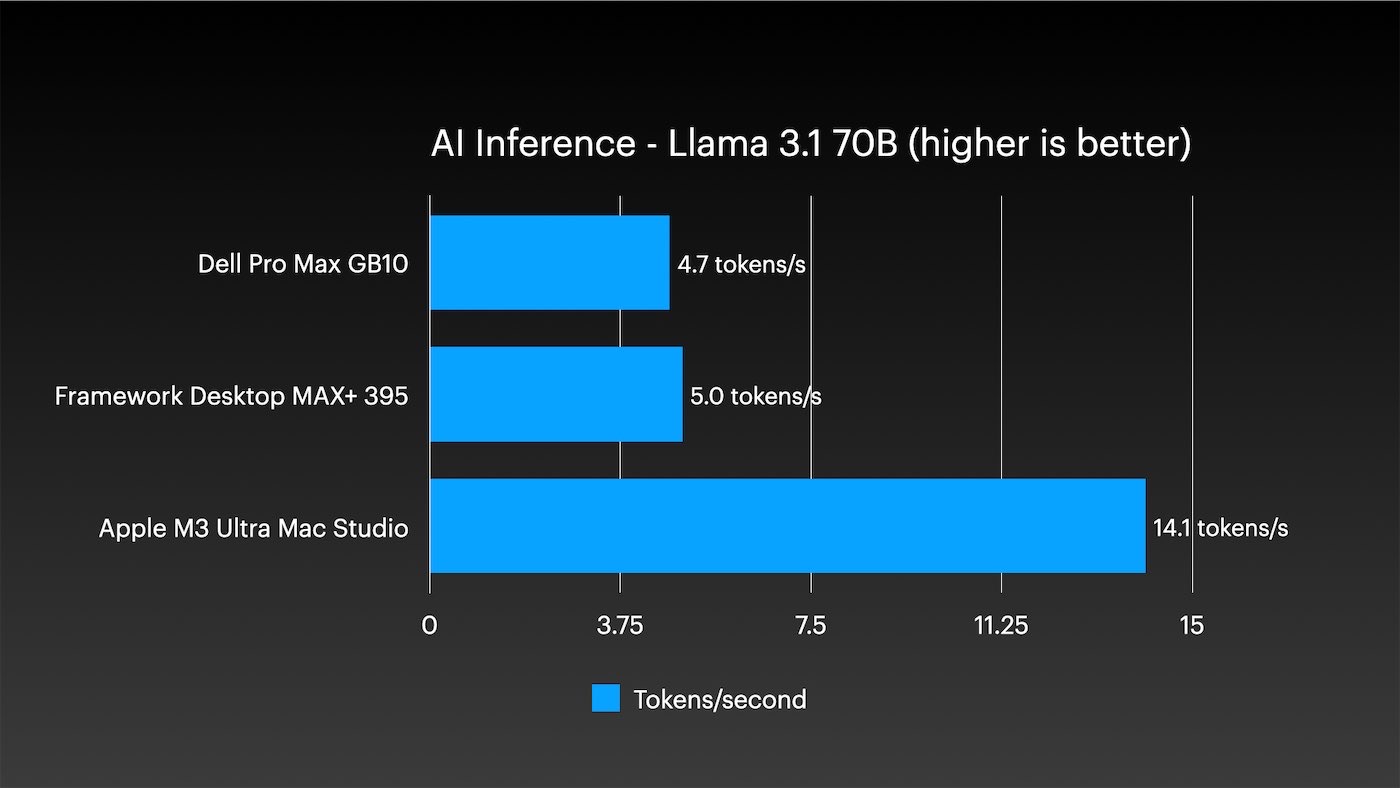
Of course, truly huge models, such as DeepSeek R1 or Kimi K2 Thinking, won’t even start on a single node of the other two systems.
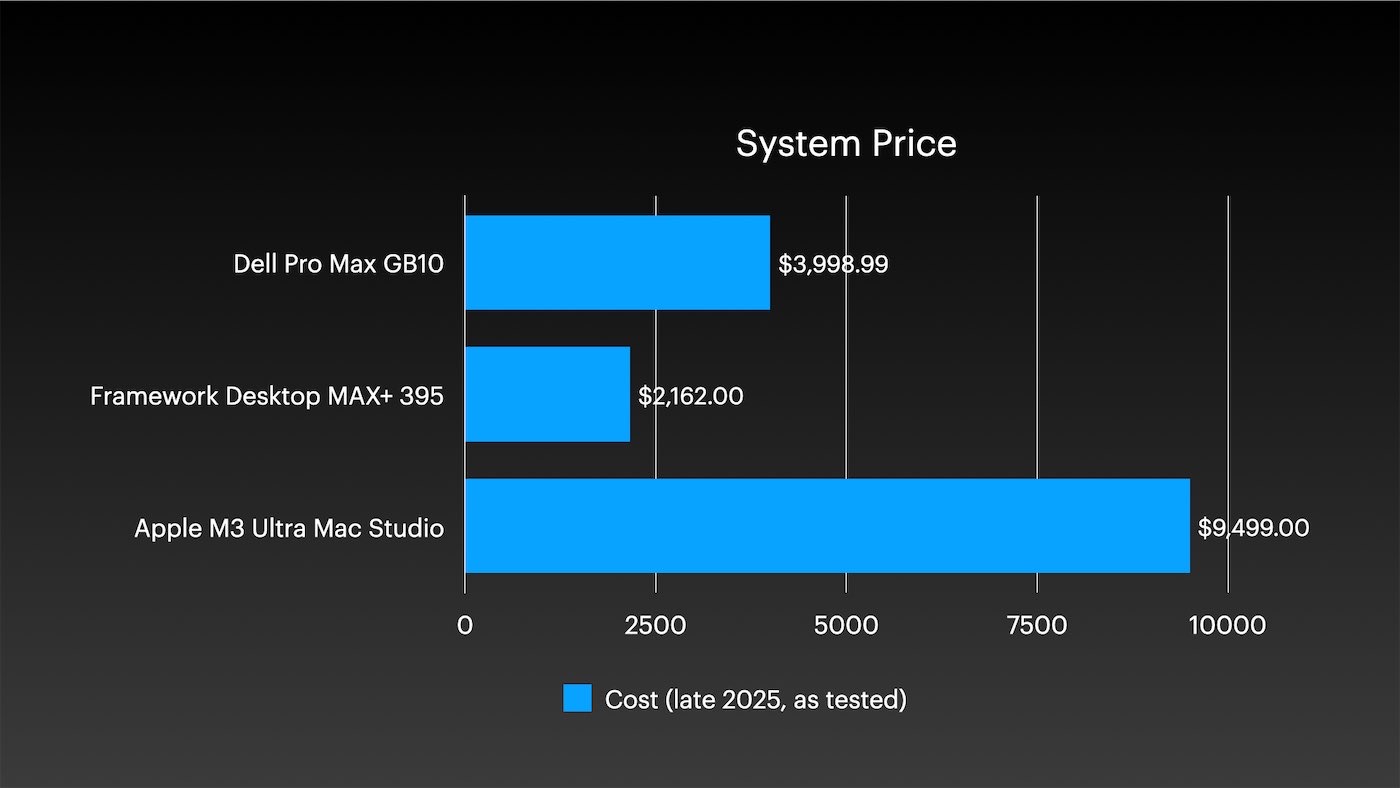
But this is a $10,000 system. When you pay more, you expect more.
And yet, consider: one Mac Studio with M3 Ultra is more powerful than my entire Framework Desktop cluster, while consuming half the energy. I also compared it with a small two-node Dell Pro Max cluster with GB10. And one M3 Ultra still came out ahead in performance and energy efficiency, having twice the memory.
Mini stack, maximum Mac
What about clustering and remote management when there are four Macs?
For me, the main obstacle was macOS itself. I automate everything I can on my Macs. I maintain the most popular Ansible playbook for Mac management and I can say with some confidence: managing Linux clusters is easier.
There are difficulties with any cluster, but managing a Mac cluster without additional tools like MDM causes many small problems. For example, did you know that a system update — say, to 26.2 — cannot be performed via SSH? You need to click buttons in the interface.
Instead of connecting KVM to each Mac, I used the built-in macOS Screen Sharing feature: I connected to each computer and performed the necessary operations via the graphical interface.
HPL and llama.cpp
When everything was set up, I tested HPL over 2.5 Gbit/s Ethernet, and llama.cpp over this same network and over Thunderbolt 5.
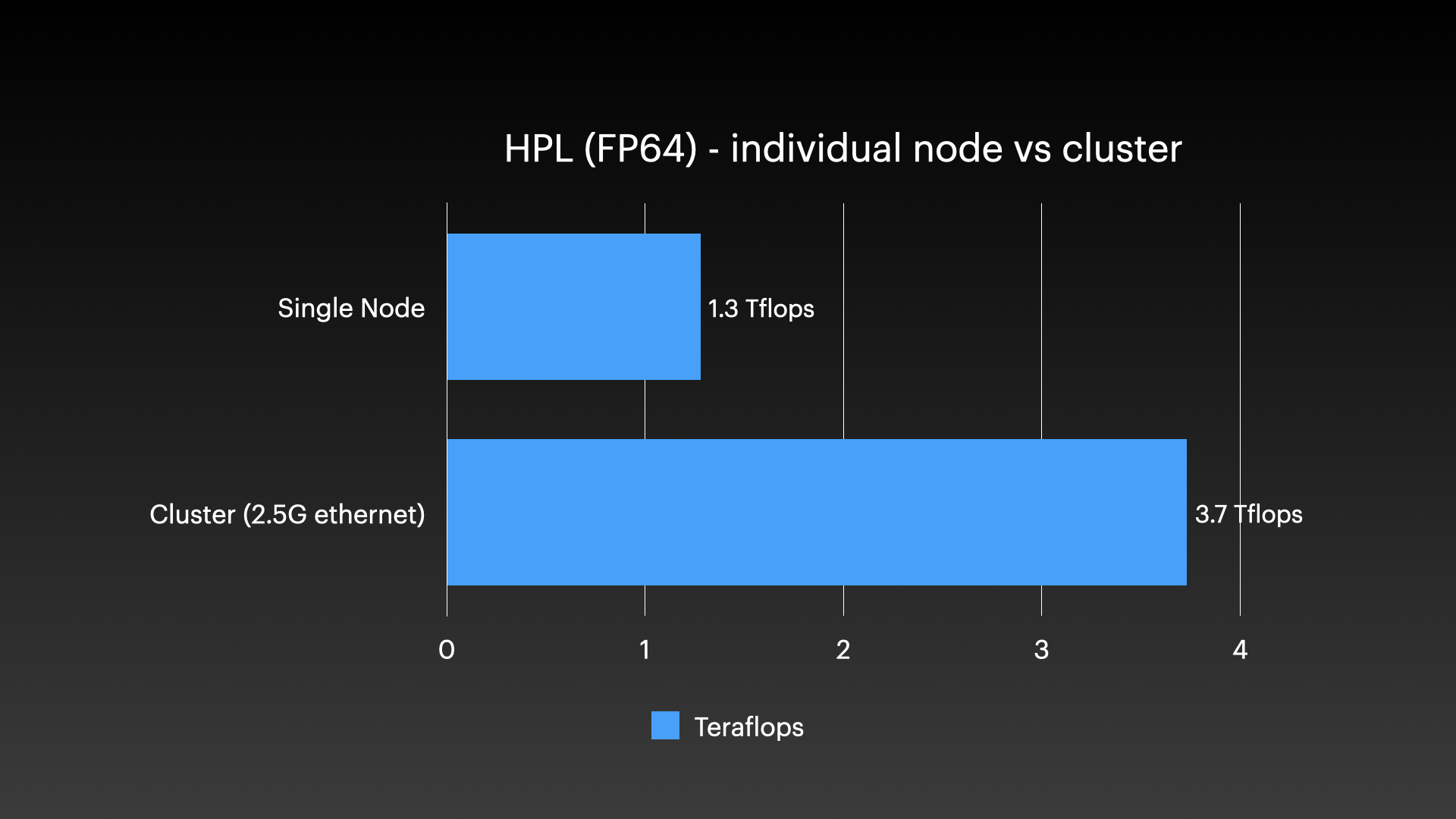
In HPL, one M3 Ultra achieved 1.3 TFLOPS. All four together—3.7, meaning the speedup was less than threefold. But remember: in the two top Studio models, memory is half that of the two bottom ones, so I expected roughly threefold acceleration.
I tried running HPL via Thunderbolt—without RDMA, just over TCP—but after about a minute, both Macs I had clustered crashed and rebooted. I investigated the possibility of using Apple MLX wrapper for mpirun, but I didn’t have time to figure it out before publishing the article.
Then I compared launching AI models in llama.cpp via 2.5 GbE and Thunderbolt 5:
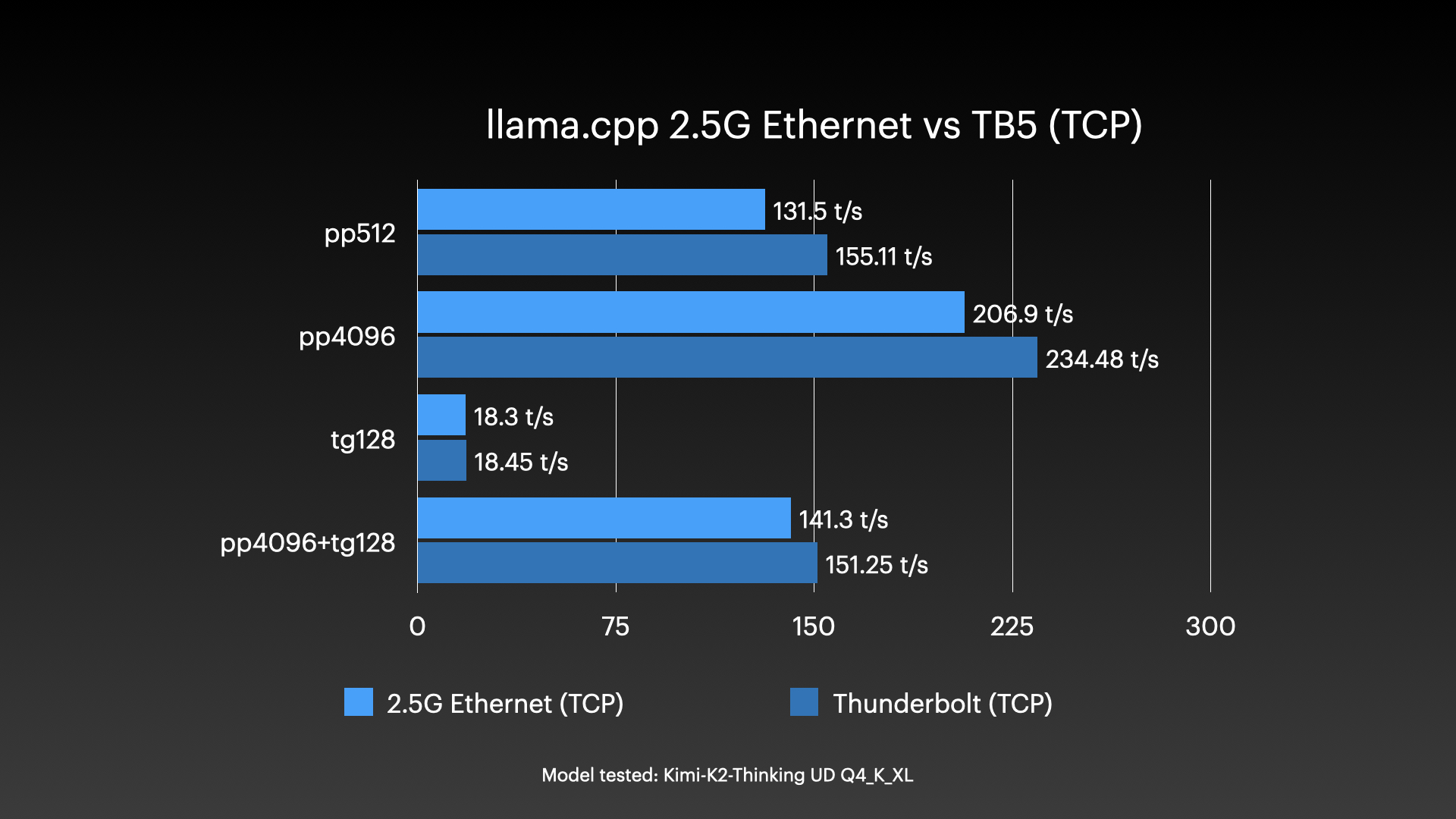
In terms of latency, Thunderbolt definitely wins, even without RDMA.
All my cluster test results with llama.cpp are listed here.. For brevity, I did not include many of the tests conducted in this article.
Enabling RDMA
Exo 1.0 released today – at least that’s what I was told. Its main feature is RDMA support for clustering Macs with Thunderbolt 5.
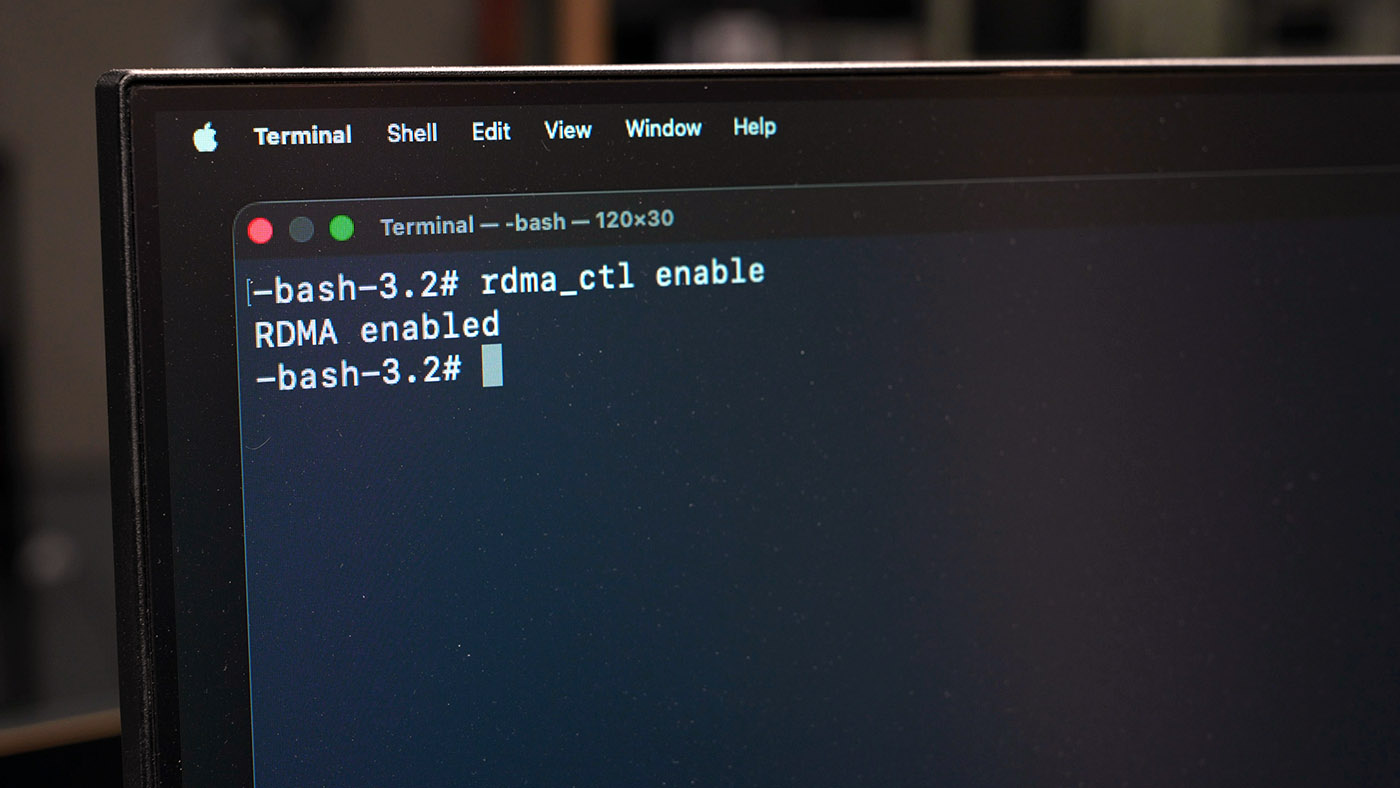
However, to enable RDMA you need to boot into recovery mode and run the command:
- Turn off the Mac Studio.
- Hold the power button for 10 seconds — a boot menu will appear.
- Go to Options, and after the interface appears, open Terminal via the Utilities menu.
- Enter
rdma_ctl enableand press Enter. - Restart your Mac Studio.
After that, I ran several HUGE models, including Kimi K2 Thinking, which at over 600 GB is too large for a single Mac.
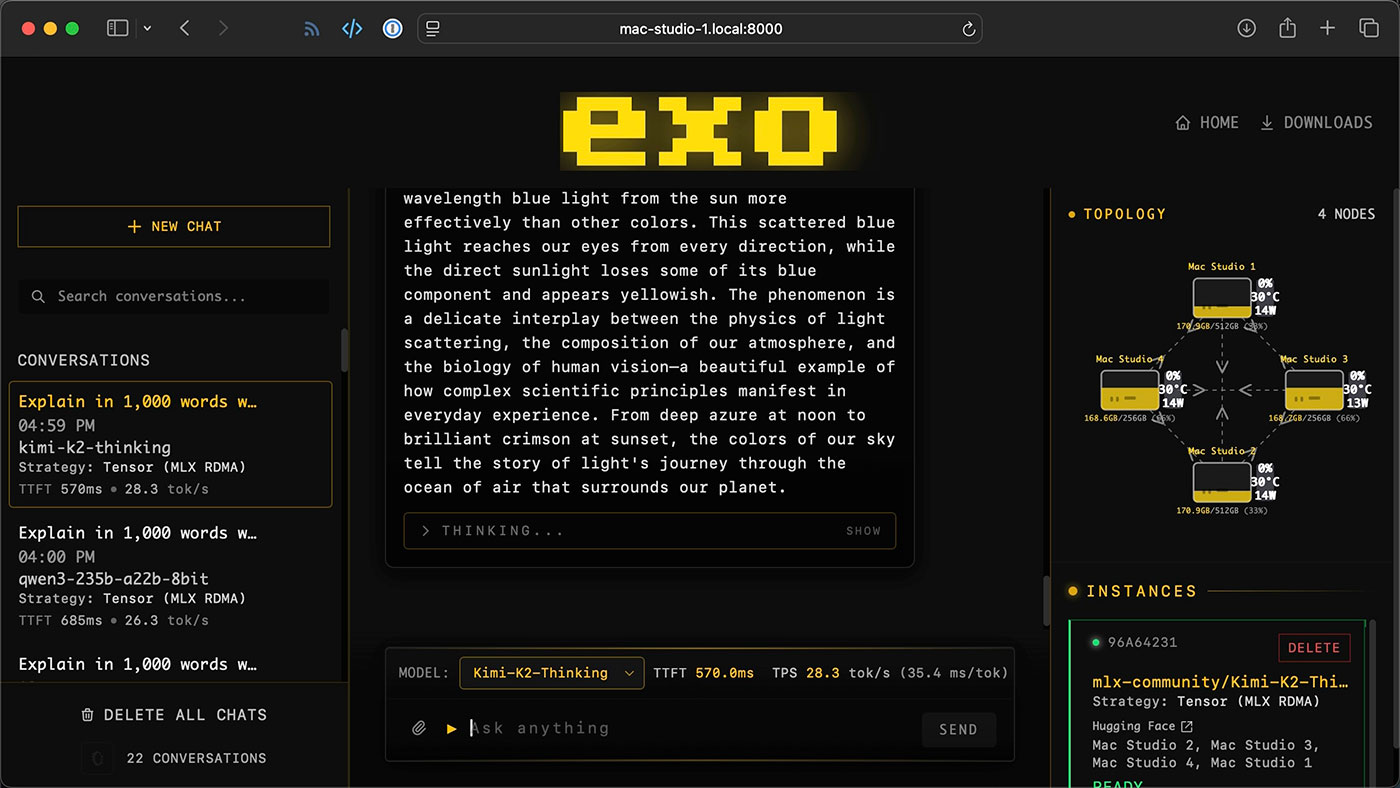
I can run such models on multiple Macs via llama.cpp and via Exo, but so far only Exo supports RDMA. Currently llama.cpp uses RPC method, distributing model layers among nodes. This allows scaling, but works inefficiently: performance drops as nodes are added.
The Qwen3 235B test clearly shows this:
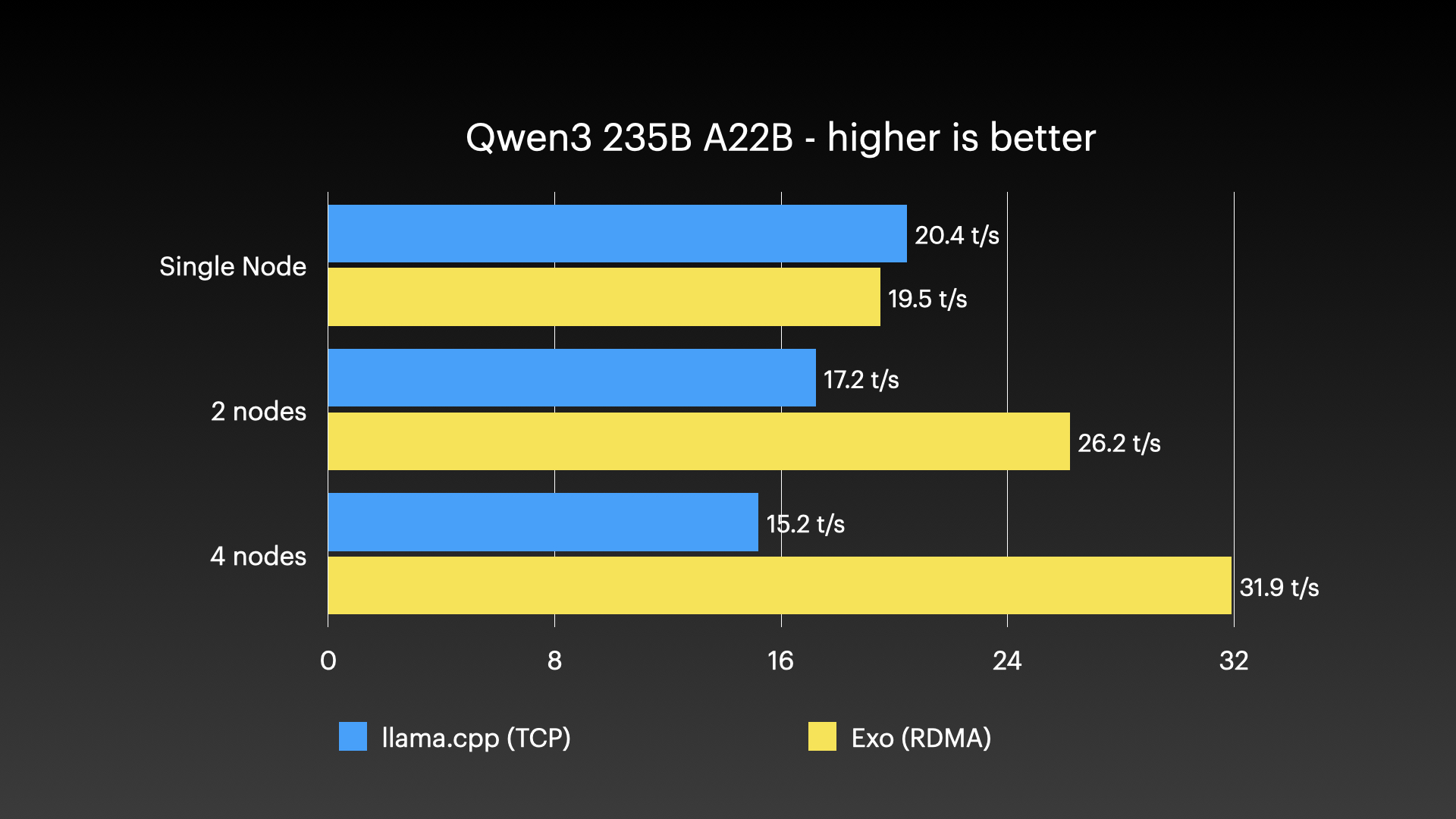
Exo, on the contrary, speeds up as nodes are added and reaches 32 tokens per second on a full cluster. That’s definitely enough for vibe coding — if you like that sort of thing. I don’t.
Therefore, I switched to DeepSeek V3.1 — a model with 671 billion parameters:
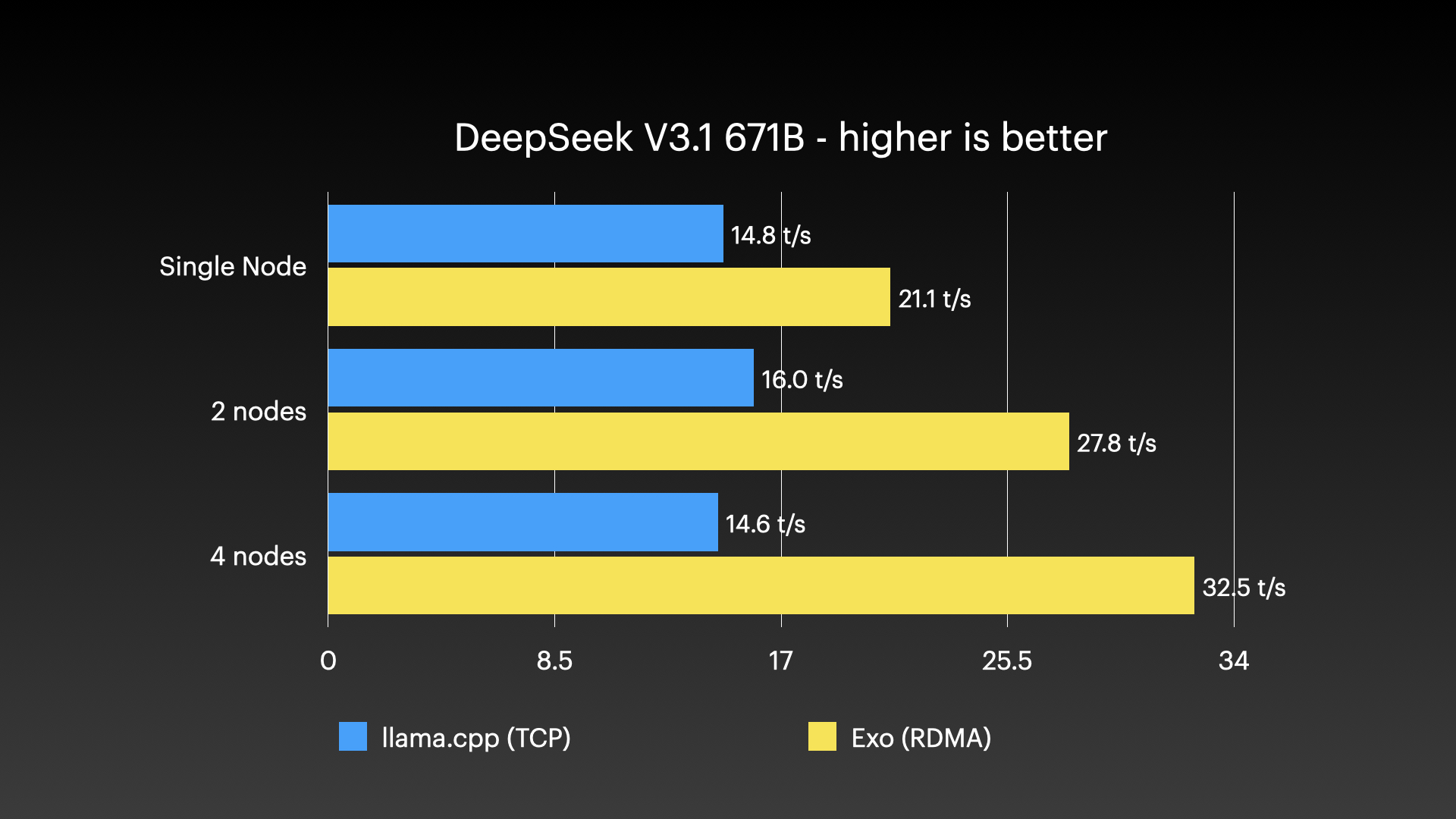
I was a bit surprised to see a slight speedup with llama.cpp. Perhaps with two nodes, network overhead isn’t that high? Not sure.
Let’s move to the largest model I have ever personally run — Kimi K2 Thinking:
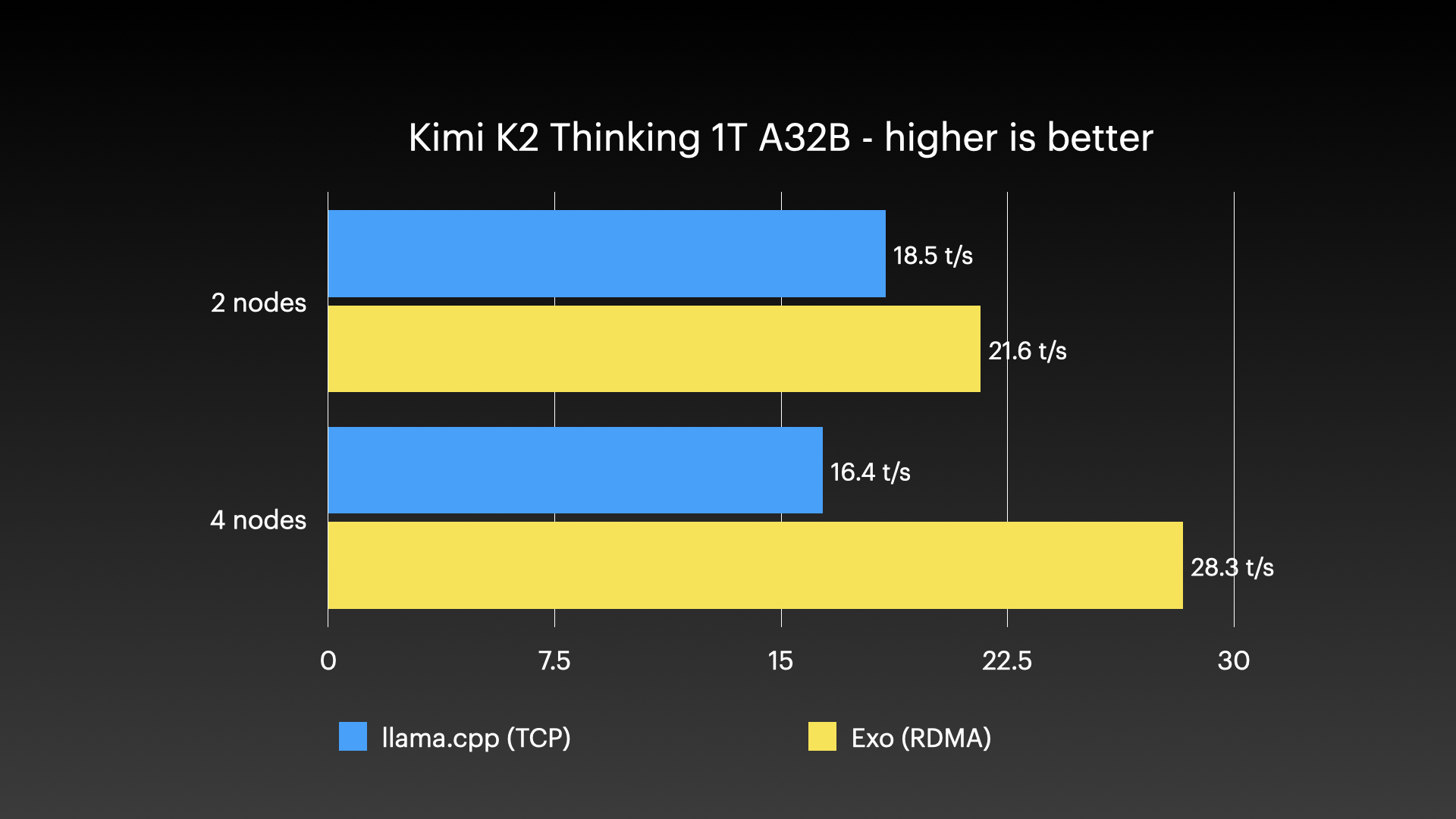
This model has 1 trillion parameters, although only 32 billion are ‘active’ at any given time — that is what the letter A in the A32B designation means.
And still we get about 30 tokens per second.
Working with some of these huge models, I see that AI can be useful, especially if it runs locally and is under my control. But it will still be quite a while before I start trusting its answers heavily: I treat them roughly like Wikipedia. Maybe a good starting point, but never let AI replace your ability to think critically!
However, this article is not about the merits of AI, but about the Mac Studio cluster, RDMA, and Exo.
They worked great… when they worked.
Stability problems
First a caveat: during testing, I used pre-release software versions. Many bugs were fixed right during the trials.
But it was obvious that RDMA over Thunderbolt is a new technology. When it works, it works beautifully. When it doesn’t… let’s just say I was glad I had set up Ansible and could quickly shut down and reboot the entire cluster.
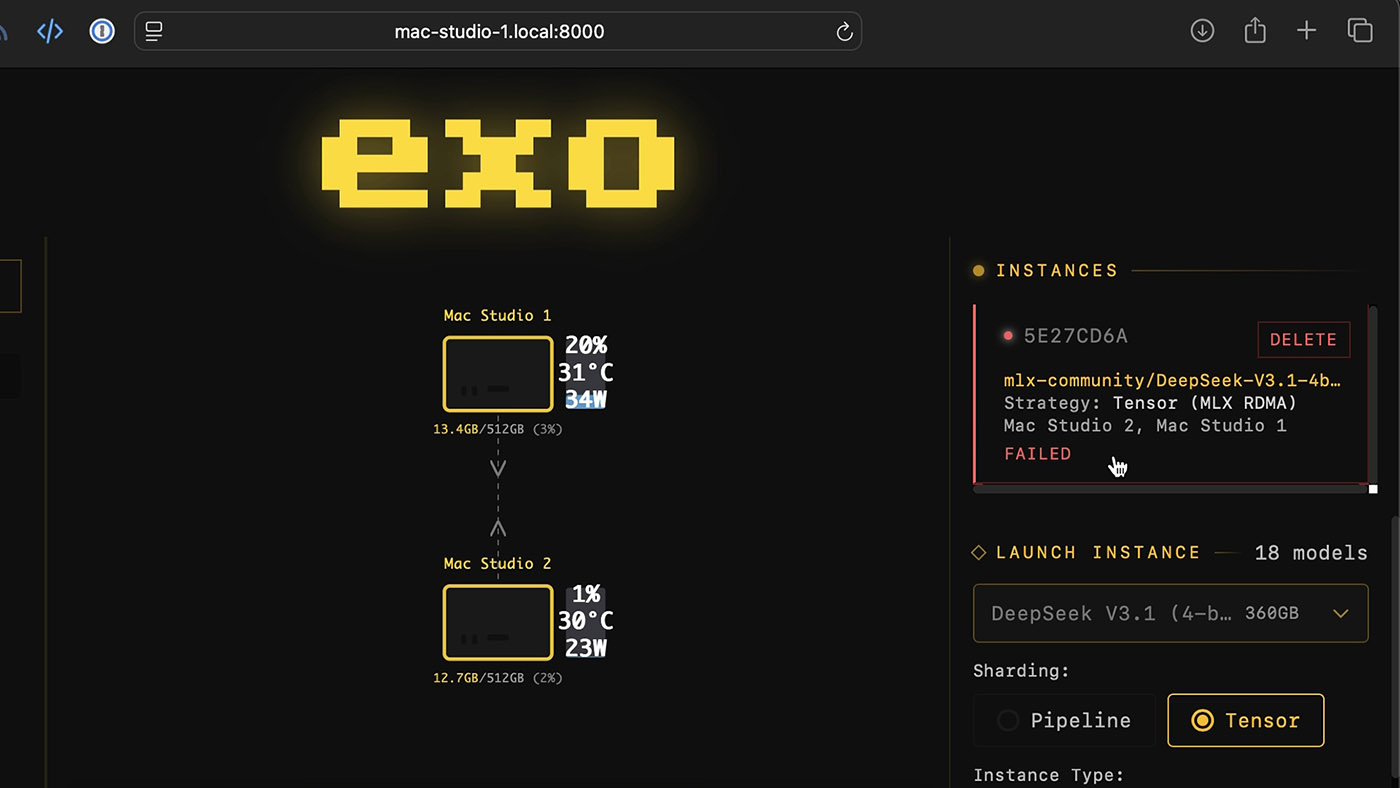
I already mentioned HPL failures when running via Thunderbolt. Even if I manage to get it working, so far I’ve only seen clusters of four Macs with RDMA—as of late 2025. However, Apple claims RDMA is enabled on all five Thunderbolt 5 ports. So perhaps more Macs can be added?
In addition, I still have certain doubts about Exo, since the developers disappeared for a while.
They remain true to their open-source roots, releasing Exo 1.0 under the Apache 2.0 license. But I wish they didn’t have to hide and develop in secret. Probably this is a side effect of close cooperation with Apple.
Of course, that’s their right. But as someone who perhaps does too much of their development openly, I don’t like the veil of secrecy around any open source project.
I’m really interested in what will happen next. They have already hinted at using DGX Spark in front of a Mac Studio cluster to speed up prompt processing… Maybe they’ll bring back Raspberry Pi support? Who knows.
Open questions and topics for further study
But I still had other questions:
- Where is the M5 Ultra? If Apple released it, it would be much faster in machine learning tasks.
- Can Apple revive the Mac Pro and give me all the desired PCIe bandwidth for faster clustering, without Thunderbolt limitations?
- Will it appear on Mac SMB Direct? Network file shares would work as if they were directly attached to the Mac. That would be great for video editing and other latency-sensitive, high-bandwidth applications.
And finally, what about other software? llama.cpp other applications could also be accelerated thanks to RDMA support.
Conclusion
Unlike most AI-related hardware, I’m generally not opposed to Apple pushing this capability so aggressively. When the AI bubble bursts, Mac Studios will still be fast, quiet, and powerful workstations for creative tasks — I myself work on an M4 Max!
But in the Apple world, not everything is rosy. Besides Mac clusters being harder to manage, Thunderbolt 5 doesn’t let these computers reach their full potential. QSFP would be better suited, but it would make the computer less attractive to people who “just need a computer.”
Perhaps, as a consolation prize, Apple could replace the Ethernet port and one or two rear Thunderbolt ports with QSFP? Then we could use network switches and cluster more than four such machines at once…
1 In the specified configurations. Apple installed an 8 TB SSD in the model with 512 GB of memory and a 4 TB SSD in the model with 256 GB.
© Jeff Geerling. Original: 1.5 TB of VRAM on Mac Studio — RDMA over Thunderbolt 5, December 18, 2025. Translation posted by XORit.
Translation editor: Салтанов А.