
Advertising screen at a Stockholm station displayed a GRUB bootloader menu
XORit Editorial · Sources, AI assistance and corrections
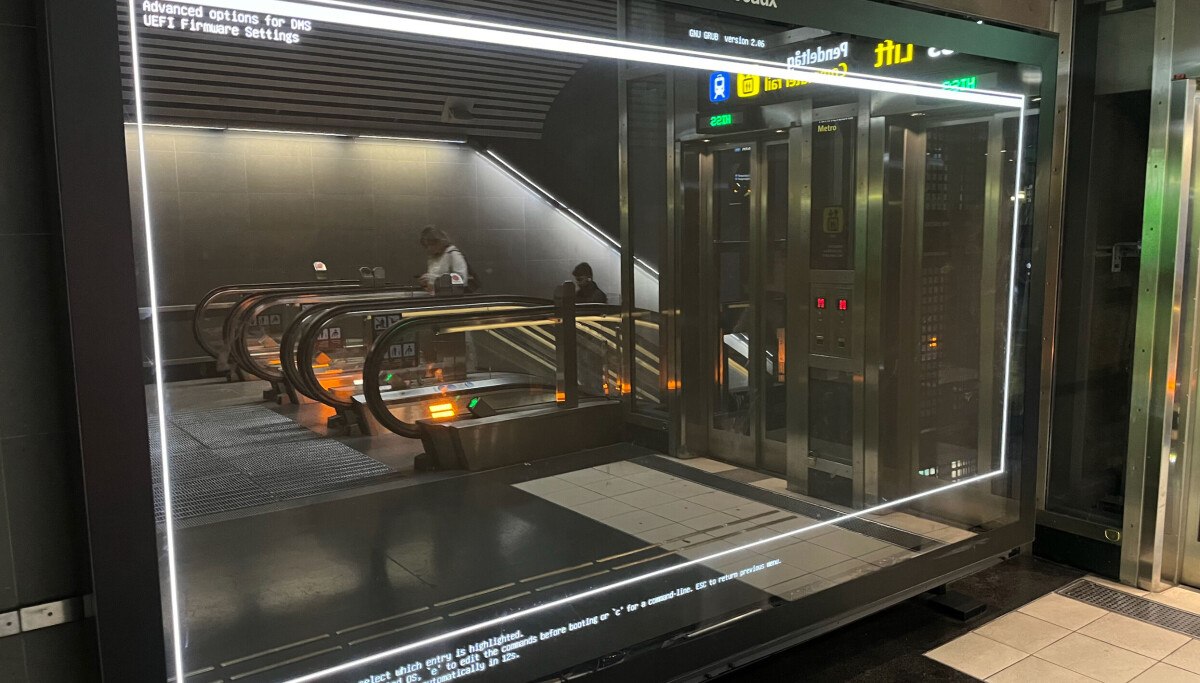
At a station in Stockholm, a large digital screen that usually loops advertising showed the GNU GRUB bootloader menu. It is the kind of sight Linux users get when they turn on a computer: the menu offered a choice between UEFI and several options marked DMS. The Register reported this on 6 October 2026, with the frame sent in by its reader Alexander. Exactly when the display ended up in boot mode is not specified.
GRUB stands for Grand Unified Bootloader. According to GNU's description, it loads the operating system kernel and hands control over to it. A choice among several menu entries is needed when a machine has more than one software environment installed, while an advertising screen has no use for such an option.
What exactly hides behind DMS is not known for certain: the publication cautiously suggests Dank Material Shell. The menu also promises a command-editing mode via the "e" key and a command line via "c", but that would require plugging a keyboard into the screen, and random passersby usually do not carry one with them.
Judging by the passengers on the escalators opposite, nobody rushed to rescue the hardware. Most likely that was not needed anyway: the screen apparently got stuck at startup and would have tried to boot again a few seconds later.
A similar case was described earlier: GRUB appeared on a bus in the UK after a filesystem failure. In the column devoted to curiosities, Windows and Android usually get the lion's share, so a large Linux screen looks like a rare guest there. The era of Linux on the desktop has not yet arrived, according to the publication, but glitches in the open-source world are still around.
Translation editors: Соловьев В., Пеков А.
Source: www.theregister.com ↗